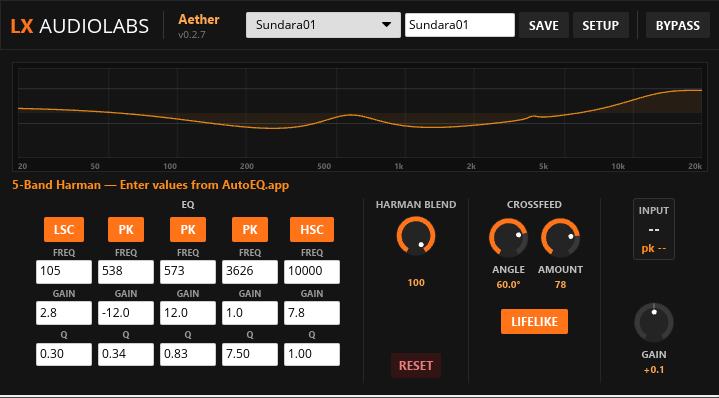
Aether v1.0.5
Aether transforms headphones into precise mixing monitors. It applies a frequency-corrected Harman curve matched to typical headphone response, letting you hear your mix translate accurately to speakers. Its spatial crossfeed engine simulates stereo imaging and room acoustics on headphones — three realism modes (Standard / Lifelike / Hyperrealistic) let you dial in the right amount of "room feel" for your workflow.
A 5-band Harman EQ with independent band types gives you surgical control over the correction curve. The crossfeed angle (30°–75° virtual speaker width) and amount controls let you match your headphone acoustics precisely. Real-time EQ graph, preset persistence, and direct value entry round out the toolset — no hunting for parameters.
Designed for use as a monitoring-chain plugin (not for mastering print), Aether sits post-master where its spatial simulation and headphone correction enhance your mixing decisions without coloring the mix you render.
Download
Mac builds are for Apple Silicon (M1–M4). Intel Macs not supported.
How to install
- Download the
.clapfile for your platform - Copy it into your CLAP folder:
- Windows:
C:\Program Files\Common Files\CLAP - Mac:
/Library/Audio/Plug-Ins/CLAPor~/Library/Audio/Plug-Ins/CLAP - Linux:
~/.clap - Or create your own folder and add it in your DAW's plugin settings
- Windows:
- Restart your DAW — or use its plugin reload/scan function
Update: Just replace the old .clap file with the new one and reload your DAW.
Features
- 5-band Harman EQ matched to typical headphone response (20 Hz–20 kHz)
- Spatial crossfeed simulation with 3 realism modes (Standard/Lifelike/Hyperrealistic)
- Adjustable virtual speaker angle (30°–75°) with degree display
- Real-time EQ curve visualization with direct value entry
- AutoEQ.app format support for headphone profiles
- Preset persistence with automatic load-on-launch
- Input peak metering with peak hold
- Zero-latency monitoring DSP
Technical
- Format
- CLAP
- Platforms
- Windows x64, Linux x64, macOS (Apple Silicon)
- Language
- Rust (nice-plug, Iced, wgpu)
Resources
SNAP — AI Analysis
Aether ships with SNAP: export your complete plugin state — spectrum, band levels, parameters — as a structured markdown snapshot. Feed that into ChatGPT, Claude, or any LLM for analysis, suggestions, or a second opinion on your mix.
SNAP saves the snapshot as a .md (Markdown) file in your plugin's vault folder.
To read it, use any Markdown reader — we recommend
Obsidian
for the best experience.