Equilibrium v1.2.4
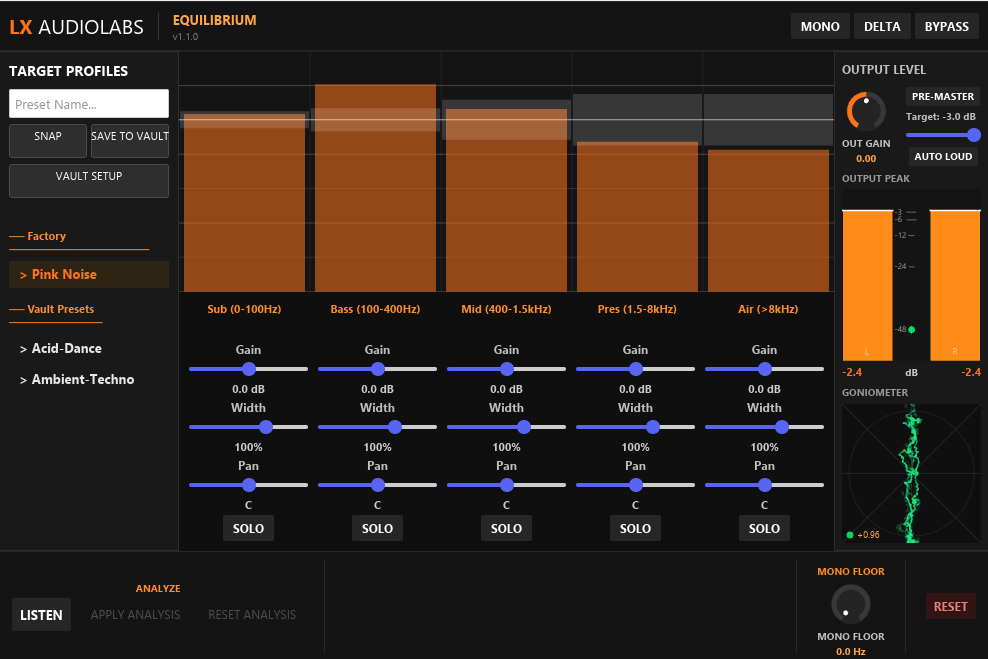
Equilibrium is your spectral balancer for the master bus. It splits the frequency spectrum into five independent bands — Sub, Bass, Mid, Hi-Mid, Presence — each with its own EQ, stereo width, and pan control. A real-time FFT overlay shows you exactly what's happening across your mix in zero-latency processing, eliminating guesswork and delivering surgical precision.
Unlike traditional parametric EQs that require you to hunt for the right frequency, Equilibrium uses band-based design: you see the problematic frequency range, measure its deviation from target, and adjust gain, stereo width, or pan directly above that band's visualization. The integrated analysis and control promotes fast, accurate mixing decisions without context-switching between windows.
Purpose-built for pre-mastering balance, Equilibrium corrects mix imbalances, tightens stereo imagery, and prepares your mix for the mastering chain. Export your plugin state via SNAP and feed it into any AI for feedback — this is the AI-First approach to mixing.
Download
Mac builds are for Apple Silicon (M1–M4). Intel Macs not supported.
How to install
- Download the
.clapfile for your platform - Copy it into your CLAP folder:
- Windows:
C:\Program Files\Common Files\CLAP - Mac:
/Library/Audio/Plug-Ins/CLAPor~/Library/Audio/Plug-Ins/CLAP - Linux:
~/.clap - Or create your own folder and add it in your DAW's plugin settings
- Windows:
- Restart your DAW — or use its plugin reload/scan function
Update: Just replace the old .clap file with the new one and reload your DAW.
Features
- 5-band spectral equalizer with real-time FFT overlay and tolerance visualization
- Independent stereo width control per band (mono to 150% width)
- Internal Mid/Side processing mode with configurable mono floor
- Phase Correlation metering and L/R balance display
- Auto Gain Compensation to maintain consistent output level during EQ adjustments
- Pre-Master Gain Correction with configurable target peak (−6 to −3 dB)
- Goniometer scope visualization with auto-scaling envelope follower
- SNAP export — structured Markdown snapshot for AI-assisted analysis and feedback
- Zero-latency processing with optional pre-master limiting
- GPU-accelerated Iced/wgpu UI with responsive band visualization
- Mono and Delta monitoring modes for diagnostic analysis
Technical
- Format
- CLAP
- Platforms
- Windows x64, Linux x64, macOS (Apple Silicon)
- Language
- Rust (nice-plug, Iced, wgpu)
Resources
SNAP — AI Analysis
Equilibrium ships with SNAP: export your complete plugin state — spectrum, band levels, parameters — as a structured markdown snapshot. Feed that into ChatGPT, Claude, or any LLM for analysis, suggestions, or a second opinion on your mix.
SNAP saves the snapshot as a .md (Markdown) file in your plugin's vault folder.
To read it, use any Markdown reader — we recommend
Obsidian
for the best experience.